


Using DISTINCT to suppress duplicate rows caused by a SQL JOIN is a common antipattern. It produces correct results but forces SQL Server to generate every duplicate row first, then sort them away – adding an unnecessary sort operation to the execution plan that scales with data volume. The better approach is EXISTS: it tests whether a matching row exists without ever generating the duplicates that DISTINCT then discards, producing the same result with a leaner execution plan.
I’ve quietly resolved performance issues by re-writing slow queries to avoid DISTINCT. Often, the DISTINCT is there only to serve as a “join-fixer,” and I can explain what that means using an example.
Let’s say we have the following grossly simplified schema, representing customers, products, and product categories:
|
1 2 3 4 5 6 7 8 9 10 11 12 13 14 15 16 17 18 19 20 21 22 |
CREATE TABLE dbo.Customers ( CustomerID int NOT NULL, Name nvarchar(255) NOT NULL, CONSTRAINT PK_Customers PRIMARY KEY (CustomerID) ); CREATE TABLE dbo.Categories ( CategoryID int NOT NULL, Name nvarchar(255) NOT NULL, CONSTRAINT PK_Categories PRIMARY KEY (CategoryID), CONSTRAINT UQ_Categories UNIQUE (Name) ); CREATE TABLE dbo.Products ( ProductID int NOT NULL, CategoryID int NOT NULL, Name nvarchar(255) NOT NULL, CONSTRAINT PK_Products PRIMARY KEY (ProductID) ); |
And then we have tables for orders and order details:
|
1 2 3 4 5 6 7 8 9 10 11 12 13 14 15 16 17 18 |
CREATE TABLE dbo.Orders ( OrderID int NOT NULL, CustomerID int NOT NULL, OrderDate date, OrderTotal decimal(12,2), CONSTRAINT PK_Orders PRIMARY KEY (OrderID) ); CREATE TABLE dbo.OrderDetails ( OrderID int NOT NULL, LineItemID int NOT NULL, ProductID int NOT NULL, Quantity int NOT NULL, CONSTRAINT PK_OrderDetails PRIMARY KEY (OrderID, LineItemID), INDEX IX_OrderDetails_OrderID_ProductID (OrderID, ProductID) ); |
And some sample data:
|
1 2 3 4 5 6 7 8 9 10 11 12 13 14 |
INSERT dbo.Customers (CustomerID, Name) VALUES (1,N'Aaron'), (2,N'Bob'); INSERT dbo.Categories (CategoryID, Name) VALUES(1,N'Beauty'), (2,N'Grocery'); INSERT dbo.Products (ProductID, CategoryID, Name) VALUES (1,1,N'Lipstick'), (2,1,N'Mascara'), (3,2,N'Strawberries'); INSERT dbo.Orders (OrderID, CustomerID, OrderDate, OrderTotal) VALUES (1,1,getdate(),32.50), (2,2,getdate(),47.05); INSERT dbo.OrderDetails (OrderID, LineItemID, ProductID, Quantity) VALUES (1,1,1,5), (2,1,3,10); |
Marketing says we want to send an e-mail or give a discount code to all the customers who have ordered a product from the beauty category. The initial attempt at a query for this might be something like this:
|
1 2 3 4 5 6 7 8 9 10 11 |
SELECT c.CustomerID, c.Name FROM dbo.Customers AS c INNER JOIN dbo.Orders AS o ON c.CustomerID = o.CustomerID INNER JOIN dbo.OrderDetails AS od ON o.OrderID = od.OrderID INNER JOIN dbo.Products AS p ON od.ProductID = p.ProductID INNER JOIN dbo.Categories AS cat ON p.CategoryID = cat.CategoryID WHERE cat.Name = N'Beauty'; |
The plan doesn’t look so bad (yet):
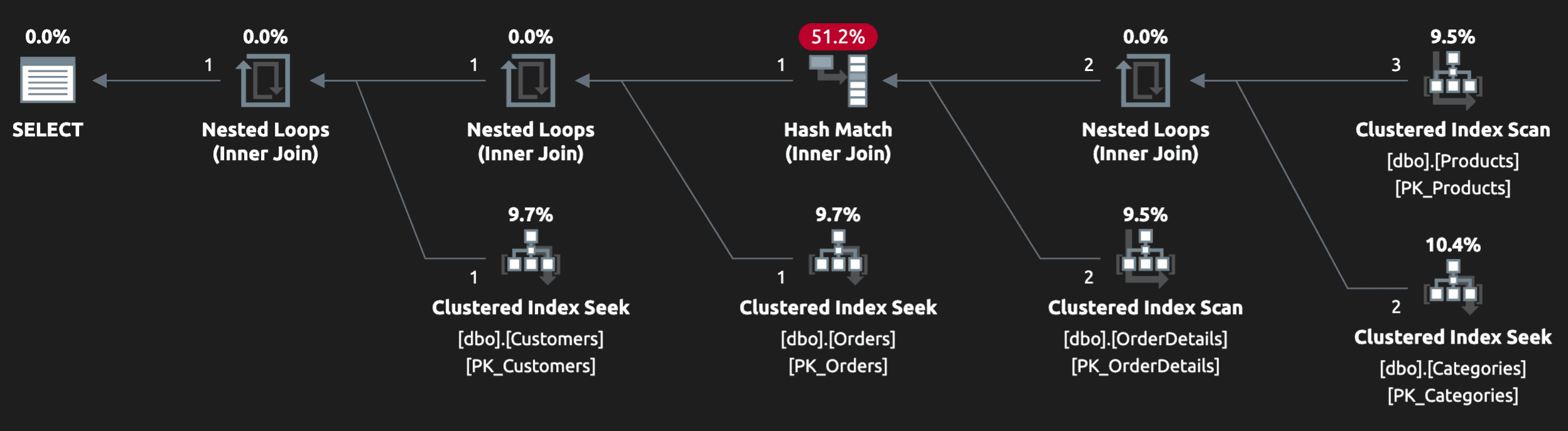
And in local or test data, the output might look right, since we may have inserted a single row into OrderDetails to match our criteria (and to make our tests pass). But what if I have ordered two products from the beauty category (in the same order, or across multiple orders)?
|
1 2 |
INSERT dbo.OrderDetails (OrderID, LineItemID, ProductID, Quantity) VALUES(1,2,2,1); |
Now the query returns that customer twice! We certainly don’t want to send them two e-mails, or issue multiple discount codes to the same customer. And the plan, on its own, can’t really provide any obvious clues that there are duplicate rows:
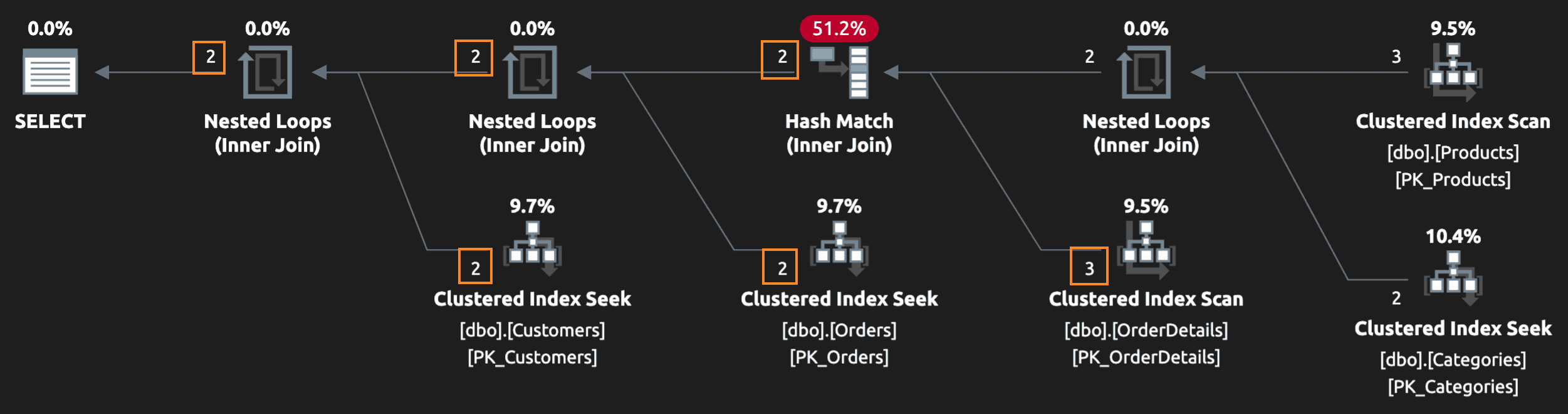
But you sure will notice if you inspect the results, or an end user will notice if you unleash this in production. The quick fix tends to be: slap a big ol’ DISTINCT on there which, indeed, fixes the symptom by eliminating duplicates:
|
1 2 3 4 5 6 7 8 9 10 11 12 |
SELECT DISTINCT c.CustomerID, c.Name -------^^^^^^^^ FROM dbo.Customers AS c INNER JOIN dbo.Orders AS o ON c.CustomerID = o.CustomerID INNER JOIN dbo.OrderDetails AS od ON o.OrderID = od.OrderID INNER JOIN dbo.Products AS p ON od.ProductID = p.ProductID INNER JOIN dbo.Categories AS cat ON p.CategoryID = cat.CategoryID WHERE cat.Name = N'Beauty'; |
But at what cost? A distinct sort, that’s what!
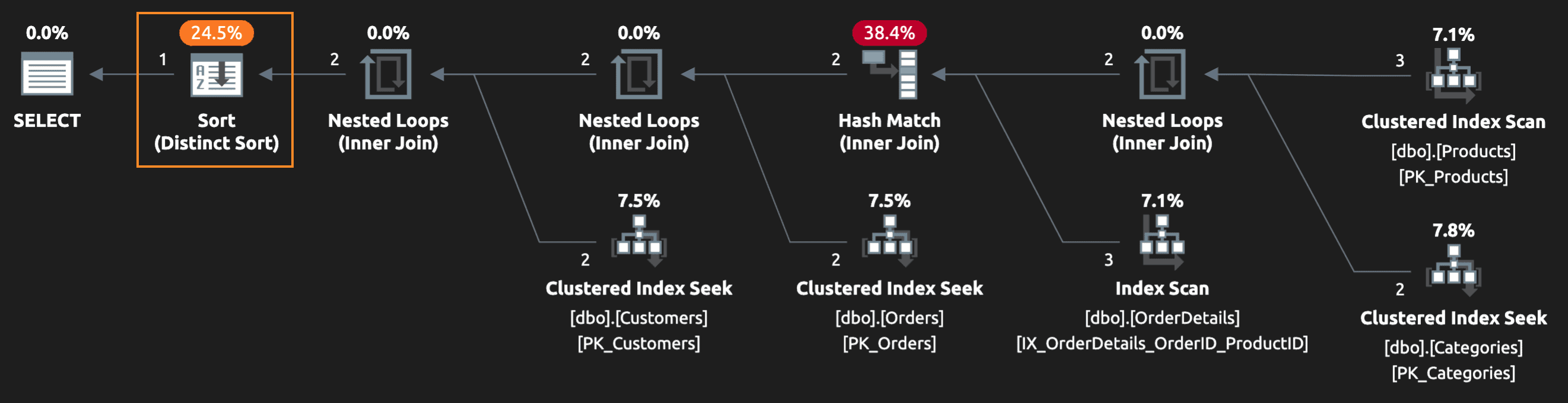
If I’m testing changes to this query in my local environment, and maybe just testing the output and that it returned the data quickly, I might miss clues in the plan and be pretty satisfied that adding DISTINCT fixed the issue without impacting performance.
This will only get worse with more data.
And while we could spend a lot of time tuning indexes on all the involved tables to make that sort hurt less, this multi-table join is always going to produce rows you never ultimately need. Think about SQL Server’s job: yes, it needs to return correct results, but it also should do that in the most efficient way possible. Reading all the data (and then sorting it), only to throw away some or most of it, is very wasteful.
Can we express the query without DISTINCT?
When I know I need to “join” to tables but only care about existence of rows and not any of the output from those tables, I turn to EXISTS.
You may also be interested in:
FULL OUTER JOIN for cases where you genuinely need all rows from both tables
I also try to eliminate looking up values that I know are going to be the same on every row. In this case, I don’t need to join to Categories every time if CategoryID is effectively a constant.
One way to express this same query, ensuring no duplicate customers and, hopefully, reducing the cost of sorting:
|
1 2 3 4 5 6 7 8 9 10 11 12 13 14 15 16 17 |
DECLARE @CategoryID int; SELECT @CategoryID = CategoryID FROM dbo.Categories WHERE Name = N'Beauty'; SELECT c.CustomerID, c.Name FROM dbo.Customers AS c WHERE EXISTS ( SELECT 1 FROM dbo.OrderDetails AS od INNER JOIN dbo.Orders AS o ON od.OrderID = o.OrderID INNER JOIN dbo.Products AS p ON od.ProductID = p.ProductID WHERE o.CustomerID = c.CustomerID AND p.CategoryID = @CategoryID ); |
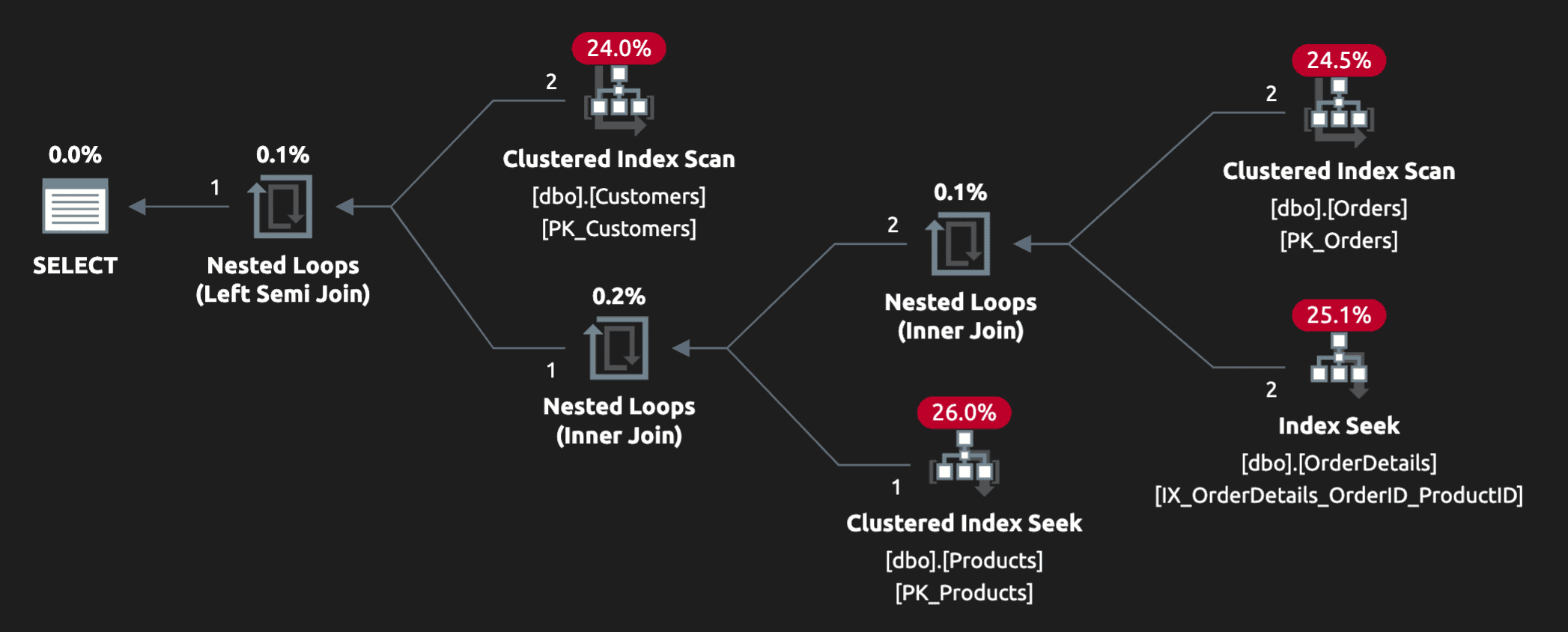
There’s a simple, additional index seek against Categories, of course, but the plan for the overall query has been made drastically more efficient (we’re down to 2 scans and 2 seeks)
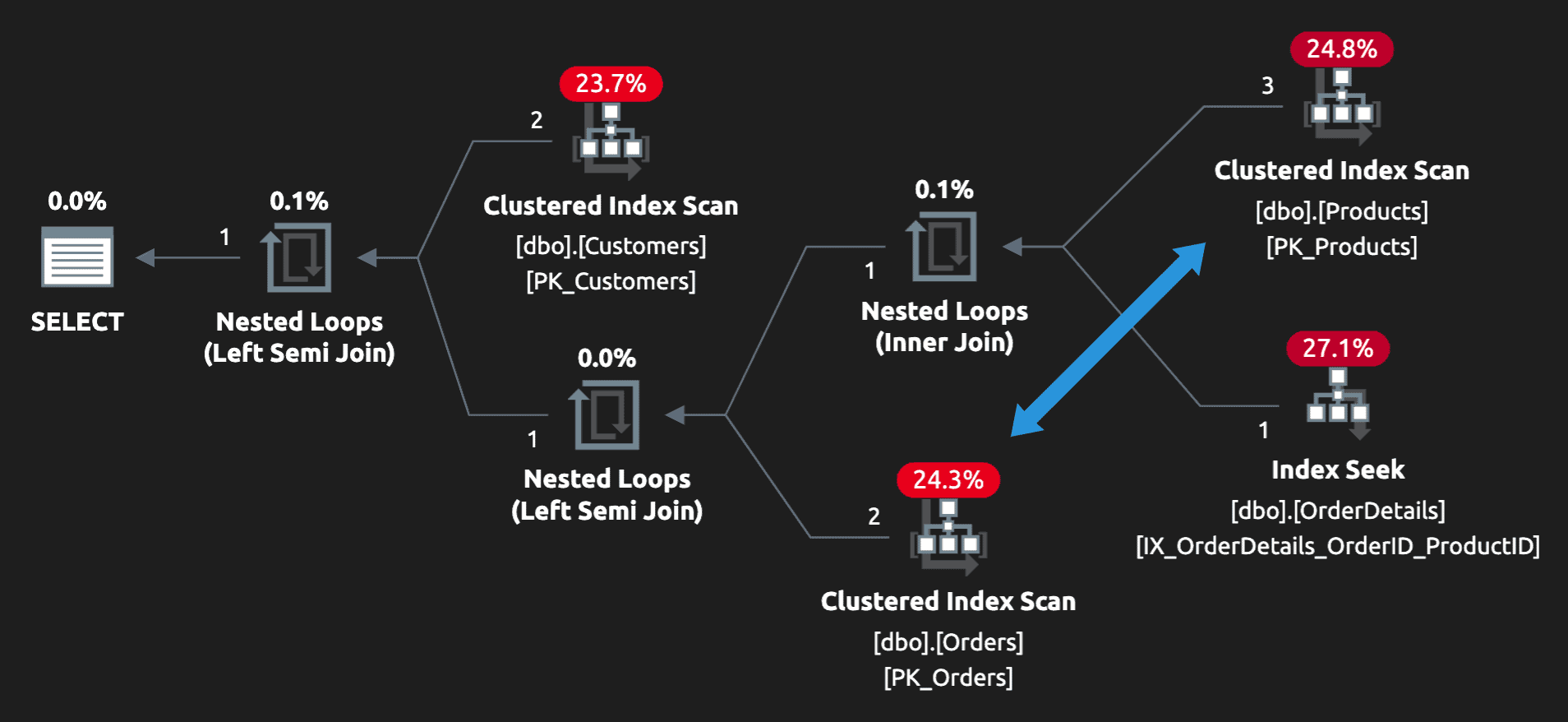
Another way to express the same query is to force Orders to be scanned later:
|
1 2 3 4 5 6 7 8 9 10 11 12 13 14 15 16 17 18 19 20 21 |
DECLARE @CategoryID int; SELECT @CategoryID = CategoryID FROM dbo.Categories WHERE Name = N'Beauty'; SELECT c.CustomerID, c.Name FROM dbo.Customers AS c WHERE EXISTS ( SELECT 1 FROM dbo.Orders AS o WHERE o.CustomerID = c.CustomerID AND EXISTS ( SELECT 1 FROM dbo.OrderDetails AS od INNER JOIN dbo.Products AS p ON od.ProductID = p.ProductID WHERE od.OrderID = o.OrderID AND p.CategoryID = @CategoryID ) ); |
This can be beneficial if you have more Orders than Customers (I certainly hope that’s the case). Notice in the plan that Orders is scanned later, hopefully after many irrelevant orders have been filtered out.
Conclusion
DISTINCT is often hiding flaws in the underlying logic, and it can really pay off to explore other ways to write your queries without it. There was another interesting use case I wrote about a few years ago that showed how changing DISTINCT to GROUP BY – even though it carries the same semantics and produces the same results – can help SQL Server filter out duplicates earlier and have a serious impact on performance.
You may also be interested in:
How parameter sniffing amplifies the cost of soft-heavy queries
FAQs: Don't use DISTINCT as a "join-fixer"
1. Why is using DISTINCT to fix duplicate rows from a JOIN a bad practice?
When DISTINCT is used on a multi-table JOIN that produces duplicates, SQL Server must generate every duplicate row before it can eliminate them. This adds a sort or hash aggregate operation to the execution plan. The work grows with data volume – every extra row in the joined tables that creates a duplicate is work that could be entirely avoided by rewriting the join logic.
2. How do I rewrite a query that uses DISTINCT as a join fixer?
Use EXISTS instead of JOIN when you only need to test whether a related row exists, not retrieve values from it. Replace ‘SELECT DISTINCT a.col FROM TableA a JOIN TableB b ON a.id = b.id’ with ‘SELECT a.col FROM TableA a WHERE EXISTS (SELECT 1 FROM TableB b WHERE b.id = a.id)’. The EXISTS version stops scanning as soon as it finds the first match – the JOIN version must find and return all of them.
3. When is DISTINCT actually appropriate in SQL Server?
DISTINCT is appropriate when duplicate rows in your result set are genuinely caused by the data itself – not by how you have written the join. For example, if two different source rows have identical values across all selected columns, DISTINCT is the right tool. The antipattern is using DISTINCT to compensate for a JOIN that is joining to a table in a way that was never intended to produce multiple rows per parent record.
4. Does EXISTS perform better than DISTINCT in SQL Server?
In most cases, yes – especially as table size grows. EXISTS uses a semi-join operator in the execution plan, which short-circuits after finding the first match. DISTINCT with a JOIN produces all matching rows and then eliminates duplicates in a separate operation. The difference is most pronounced on large tables with many matching rows per join key.
This document contains proprietary information and is protected by copyright law.
Copyright © 2026 Red Gate Software Limited. All rights reserved





Load comments